So, you have just purchased your new iPhone 6 or iPhone 6 Plus. Quite coincidentally, news of a hacking of nude celebrity photos erupted, involving accounts on the Apple iCloud. As a private individual, you deserve privacy. Here are some helpful tips to secure your new iPhones.
Two-factor authentication
As we have always highlighted in recent articles, enabling the two factor verification is a robust security option. This security feature emerged at the height of the breaking down of the strength and integrity of passwords, which were rendered insufficient by the growing threat landscape. Today, password alone is inadequate to protect you online. This security tool prevents almost all sorts of attacks such as phishing scams, data theft and unauthorized access.
Two-step authentication serves as an additional protection layer for your Apple ID. That means a second security code, say a combination of numbers, will be needed when you log in to your account using initially a password. The second security factor will be pushed into one of your trusted devices.
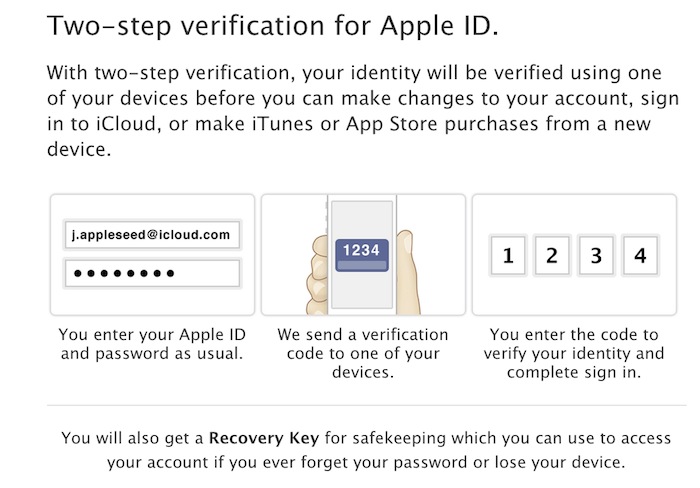
In order to activate the two-step verification on your Apple device, go to Apple ID and choose the Password and Security option in which you will need to register your trusted device, say another mobile phone. A recovery key will be given to you, which you will then need to print out in case you lose your iPhone.
Apple Touch ID
The Apple Touch ID, which the Cupertino giant, launched last year has been quite an effective security tool. The first time you open your new iPhone, the device will display a prompt message asking you to enable the fingerprint recognition system.
Do so. By activating the Touch ID, every user that tries to access an iPhone will be required to enter their credentials for authentication. The technology was first integrated into the iPhone 5S launched last year. The feature also makes your fingerprint a checkpoint to unlock your device or facilitate purchases on the Apple App Store.
On the other hand, if you have already opened your iPhone 6 or iPhone 6 Plus but bypassed the activation of the Touch ID, you can go to Settings and simply turn it on by following a few easy steps.
But all of this does not mean those who own older models of the iPhone have no option to secure their accounts and devices. You can still implement some measure of security by setting a passcode on your handset.