• Skip to primary navigation
  • Skip to main content
  • Skip to footer
  • Home
  • Advertise With Us
  • Contact

TechWalls

Technology News | Gadget Reviews | Tutorials

  • Reviews
  • Guide
  • Home Improvement
  • Gadget & Apps
  • Deals
  • News

How to Save Videos Captured by Ezvid to your Computer

By Tuan Do

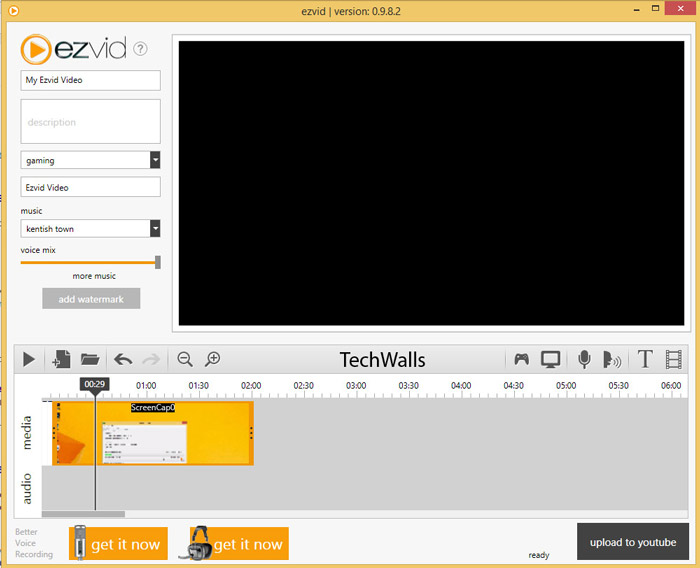
You might have used the Ezvid software to record your screen. I have to use it on my Windows 8 machine because this is a popular screen recorder, it is free and easy to use.

However, I have some issues with the software. I can’t preview the output video, and there is no option to save the video to a file. Ezvid allows uploading directly to Youtube at the moment and I don’t really like it because I have to provide Youtube credentials within the software and I’m not sure the freeware is reliable enough.
ezvid

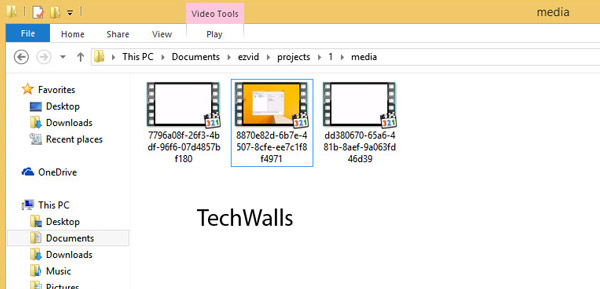
Fortunately, I found a way to retrieve the videos I captured using Ezvid. The software saves all of our screen-recording videos to its own folder in My Documents. Specifically, here is where I found my videos: C:\Users\Tuan\Documents\ezvid\projects\1\media
ezvid-2

So, now you can get your videos and bring it to your video editor. Hope it helps.

Reader Interactions

Comments

  1. TheUnisister says

    Dec 18, 2015 at 3:40 pm

    Um, but I can’t find it there! I tried to find it on every single one, but the only thing that appeared was the images I used to make the video… I deleted the “Made using Ezvid” video… is that it? Or is it something to do with the settings?

    • Ash says

      Oct 20, 2017 at 7:52 am

      i had the same trouble…i can’t find my files

  2. Tech PNG says

    Dec 12, 2016 at 4:23 am

    Thanks mate. This really helps

  3. Technology PNG says

    Mar 31, 2017 at 7:20 am

    Great. It works

Disclosure: We might earn commission from qualifying purchases. The commission help keep the rest of my content free, so thank you!

Footer

Pexar Starlight 15.6″ Digital Photo Frame Review – Turning Family Photos Into Gallery-Worthy Displays

TourBox Elite Plus Review: A Better Way to Edit in Lightroom Classic

Ugee Trio Pad UT3 Review – A Giant Matte Tablet That Feels Almost Like E-Ink

MEEPO Flow Electric Skateboard Review – A Beginner’s Experience

Follow TechWalls

YoutubeFacebookXInstagram

Recent Posts

  • The Sound-Driven Relaxation Revolution: Introducing the Vibroacoustic Therapy Chair
  • Pexar Starlight 15.6″ Digital Photo Frame Review – Turning Family Photos Into Gallery-Worthy Displays
  • Curate the Perfect Workspace: The 2025 Christmas Guide to NuPhy Keyboards for Every Need
  • TourBox Elite Plus Review: A Better Way to Edit in Lightroom Classic

Copyright © 2025 · All Rights Reserved