• Skip to primary navigation
  • Skip to main content
  • Skip to footer
  • Home
  • Advertise With Us
  • Contact

TechWalls

Technology News | Gadget Reviews | Tutorials

  • Reviews
  • Guide
  • Home Improvement
  • Gadget & Apps
  • Collectible
  • Deals
  • News

LCC Connection Utility Does Not Open on Mac, How to Configure Logitech Mouse

By Tuan Do

As I’m using the Logitech M570 trackball, it comes with the Logitech Control Center software to customize mouse button, check battery status.

I downloaded and installed the app on my Mac, then I saw a new app named LCC Connection Utility appear on Launchpad. However, when I tried to run the app, there was an error showed up on the screen:

“Please connect your Logitech cordless mouse Mini Receiver in a USB port and restart this program.“

Of course I plugged in the receiver to my Mac but somehow it couldn’t detect it. Changing USB port or restarting the computer wouldn’t solve the issue.

After contacting Logitech, I figured out that this is not the app to launch Logitech Control Center. Instead, you will have to go to System Preferences, the Control Center can be found on the bottom.
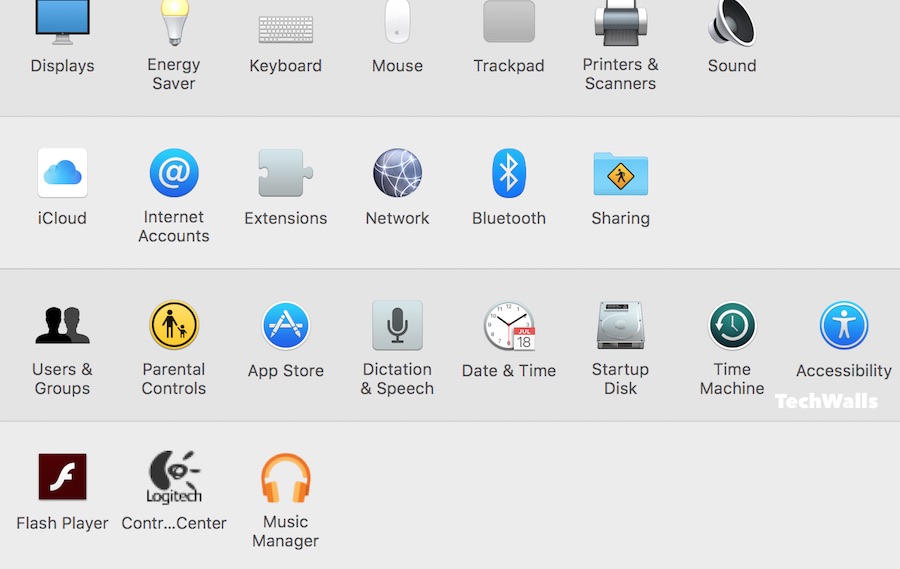
system-preferences

To configure your Logitech mouse, just select it and click on the button Configure.
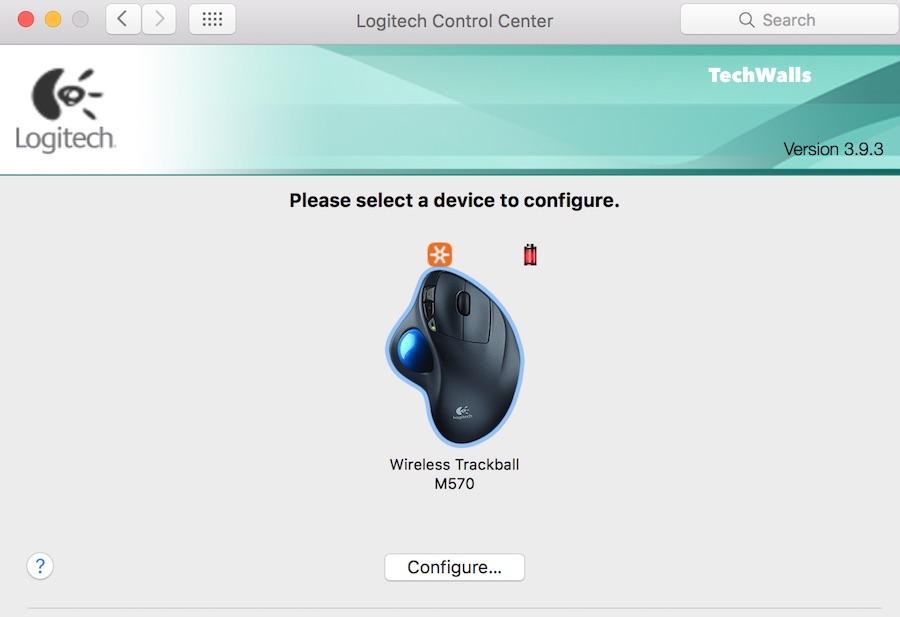
logitech-control-center

That’s it. Now you can assign buttons, see battery level and adjust tracking speed multiplier for your mouse.
Disclosure: We might earn commission from qualifying purchases. The commission help keep the rest of my content free, so thank you!

Footer

INIU P781 SnapGo Air 10000mAh Review: My Favorite Everyday MagSafe Power Bank

Provirtec Pawtent Pro Pet Air Purifier Review: A Smarter Way to Keep a Pet-Friendly Home Fresh

Autonomous ErgoChair Pro Review – Revisiting After 6 Years

Thinborne Aramid Fiber iPhone 17 Pro Max Case Review

Follow TechWalls

YoutubeFacebookXInstagram

Recent Posts

  • INIU P781 SnapGo Air 10000mAh Review: My Favorite Everyday MagSafe Power Bank
  • Father’s Day Gift Guide 2026: Perfect Gifts for Tech and DIY Dads
  • Provirtec Pawtent Pro Pet Air Purifier Review: A Smarter Way to Keep a Pet-Friendly Home Fresh
  • Megawheels D2 Series Review: Which Electric Dirt Bike Fits Riders Aged 8 to 16?

Copyright © 2026 · All Rights Reserved