We all know that Android is king when it comes to customization and nothing comes close to it. Rooting takes the powers of open source Operating system to another level. Level is further increased when one installs custom ROMs and recovery.
Keeping all the powers of Android in mind one of the recognized developer at XDA has made an application which allows you to set different font for different applications isn’t that amazing? Enough if you have a rooted Android device it is pretty difficult to change the font of each application but now you can do this easily with the help of application named PerAppsFont which makes the use of a new kind of Xposed Framework module (we will get to it in a while).
Requirements:
There is only one requirement of this application which is you need to have Xposed Framework Module installed. In case you don’t know what Xposed Framework is? You can follow this detailed Xposed guide which we prepared earlier So I am not going to into detailed instruction about Xposed Framework.
Instructions to install PerAppsFont:
Instructions to change fonts for each application are damn easy to follow:
- Install Xposed Framework Module which you learnt just now.
- Then you will need to install PerAppsFont from Xposed Installer and enable it. This module has the ability to change fonts of each different application without flashing a zip thanks to Xposed Framework.
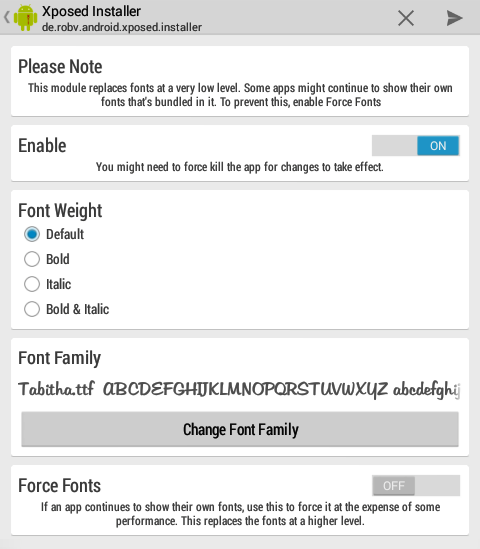
- Download fonts in your storage either fixed or SD. Then head over to Preferences option from the Main Menu of PerAppsFont.
- Now select the font folder which you transferred to your storage earlier.
- Reboot and it’s done.
Points to keep in Mind:
- You don’t need to reboot your device if you switch from one app font to another.
- A reboot is needed if you change Font Folder.
- A reboot is need if you add new fonts to Font Folder.
- Don’t add more than 500 fonts in the folder if you are running a single core device. (it affects the performance)
In case you run into trouble at any point make sure to ask us in comments section below. If you want to know in detail about PerApsFont or you are a app developer and want to develop it further then you can head over to this XDA forum on PerAppsFont.