If you are reading this post, you are probably looking for a solution to unlock and read data from a BitLocker drive on a Mac machine. In case you haven’t heard of BitLocker, it is a feature in Windows to protect us from data theft on lost or stolen computers. When our computer is lost, our biggest worry is not the value of the laptop itself but the important information stored in the device; The thief can use tools to get unauthorized access to our hard drives, retrieve private data and take advantage of it. Bitlocker prevents it by encrypting entire drives and enhancing system protection.
However, the problem is that if you encrypt an external hard drive or a USB flash drive and plug it to a Mac, the machine won’t be able to recognize and read the data inside. iSumsoft BitLocker Reader for Mac is the solution in this case; It does not only give us the read access but also the write access to BitLocker-protected drives.
The app is built for pro users who use external storage devices to work between Windows and Mac. It will simplify the workflow and save a lot of time transferring files between the two operating systems. Once you download and open the app, it will present you with a simple interface showing available drives. Just plug your external hard drive, USB flash drive, or memory card to your Mac and it will show up in the list. The next step is selecting the BitLocker-protected drive and clicking on Unlock.
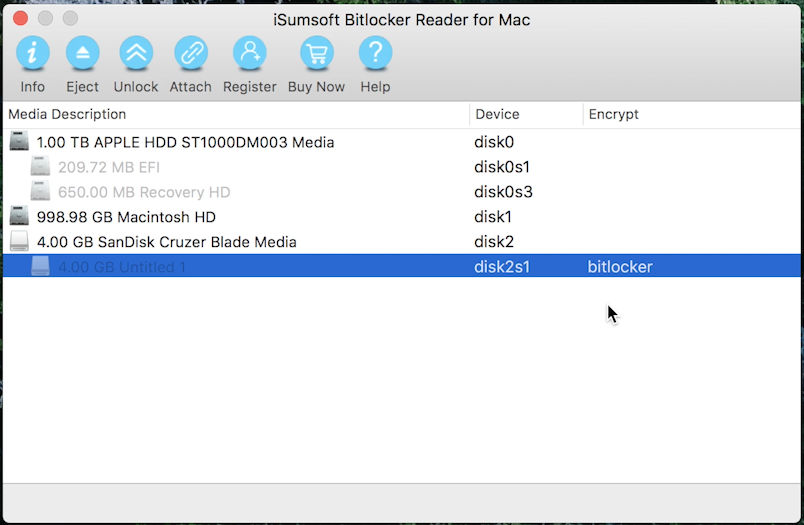
Notice that you will need your password or recovery key file to unlock the drive. Once the process is completed, you can open the drive and transfer files back and forth.
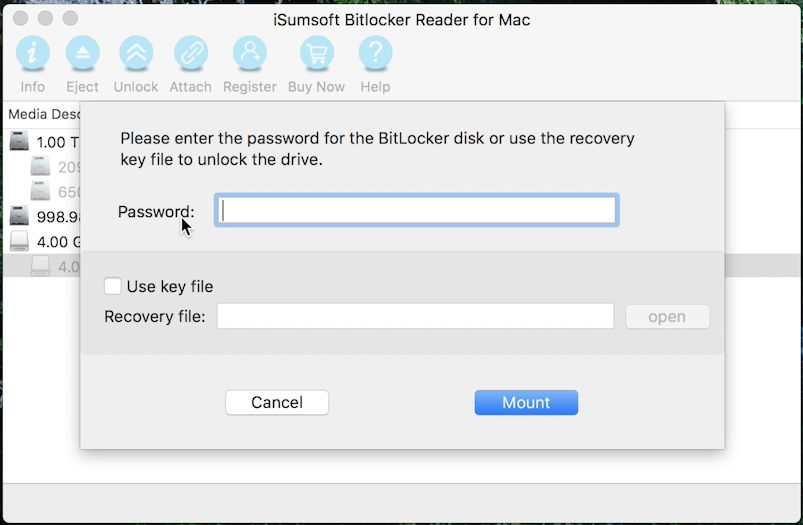
You also don’t have to worry about breaking the protection of your drive because it will still be encrypted. When you move back to Windows, it still requires credentials to be unlocked.
Notably, the app has an Attach feature that allows us to open and manage data from DMG image files. This is a good alternative to the MacOS’ built-in DMG mounting tool, especially when it might not work in some cases.
iSumsoft BitLocker Reader is a paid app that costs just $19.95. It supports popular file systems like FAT32, exFAT, and NTFS. It is compatible with the newest Mac OS as well as older versions down to Mac OS X 10.7 Lion. Even when you use an older version, you can still give it a try since it comes with a 30-day money back guarantee.