Google has recently introduced a new application named Google Wallet which behaves as a virtual wallet. It not only saves time but also allows you to manage your payment cards, offers etc. very efficiently on your phone and online.
For the latest Samsung Galaxy Nexus, previously it was a little tough task to install Google Wallet on it for a non-technical average user. It previously needed to unlock the bootloader, rooting and many more tech tricks which finally allow the user to accommodate with Google Wallet.
But now Google has surfaced with the simpler and faster method to access the Google Wallet. Now the user just simply needs to download and install the Wallet from the Android Center as an Android app.
But the application is surfaced in U.S. only till now. And moreover the another drawback is regarding the Android Version i.e. the Android 4.0.2 or higher versions can only use this newbie Google application.
Here are the steps to get your Google Wallet on your Samsung Nexus
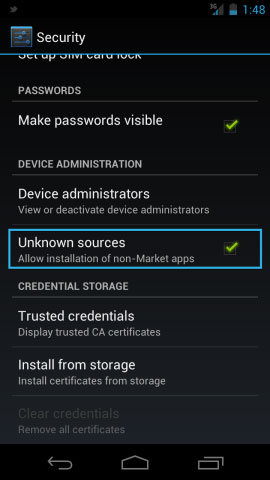
Step 1: Before downloading and installing, make sure that you have allowed downloading apps from unknown sources. To allow installing, launch your Settings menu and go to the Security option. Scroll down and check a box next to Unknown Sources option.
Step 2: Now from your Nexus, visit the XDA Developers forum. Under this section, you will see a link named as “com.google.android.apps.walletnfcrel.apk”. Now tap it to download it. It’s your Google Wallet app!!
Step 3: After finishing with the download process, open it and start with the installation step. Complete the installation by confirming the steps.
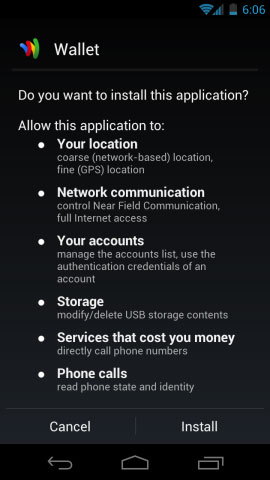
Step 4: Once you have finished installing Google Wallet on your Samsung Nexus, you will see a $10 credit issued to you as a Google Gift card.
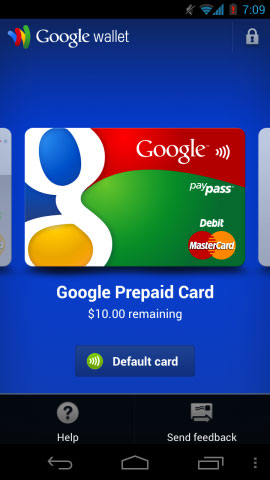
Reach out with your Nexus and enjoy the credits. Experience a new world of shopping without actually having your wallet in your pocket.