Recently I purchased some apps on the Apple App Store for my MacBook but they are not fully functional like expected. As those apps are quite expensive, I decided to try requesting a refund from Apple.
However, the problem is that Apple’s terms and conditions clearly states that all sales of apps are final, so how can we receive the refund? Here are the steps.
1. Open iTunes.
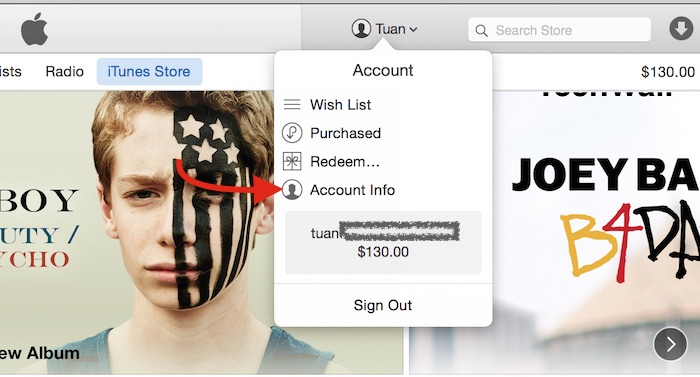
2. Click on your name on the top right corner and select Account Info.
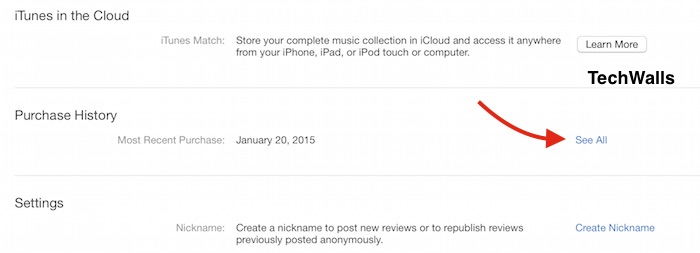
3. Now you will see the Account Information screen, scroll down to the Purchase History section and click on the See All link.
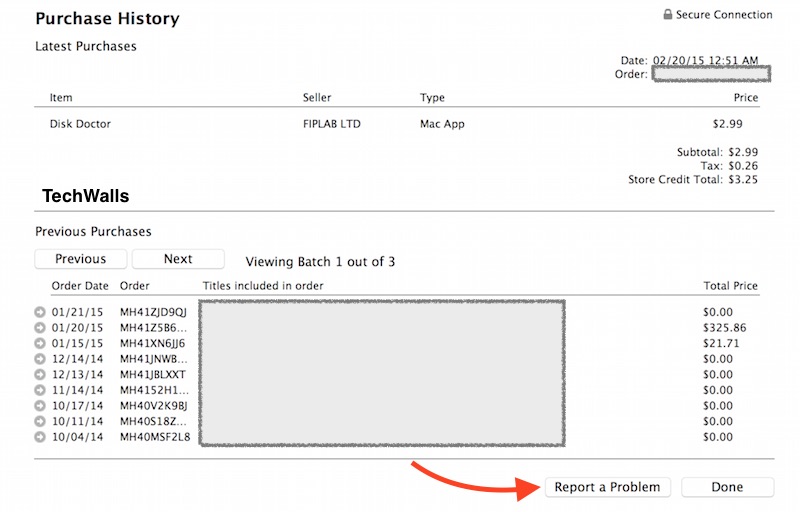
4. All of your purchases will show up. If you have a problem with your latest purchase, just click on Report a Problem button. If it is a problem with a previous purchase, you need to click on the arrow at the start of the corresponding order.
5. A Report a Problem link will appear on the same line with the app. Click on the link.
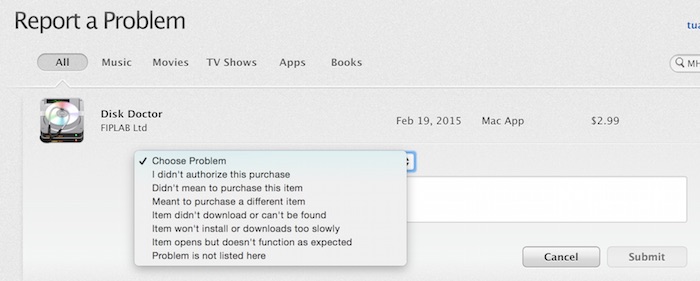
6. You will be navigated to an Apple webpage to report your problem. Just choose a problem and click Submit.
7. After that, just wait and you might receive the refund in just a few days. In my case, Apple sent me iTunes credit instead of a refund to my bank account although I used my credit card to purchase the app.
Let me know if you were able to receive the refund successfully.