• Skip to primary navigation
  • Skip to main content
  • Skip to footer
  • Home
  • Advertise With Us
  • Contact

TechWalls

Technology News | Gadget Reviews | Tutorials

  • Reviews
  • Guide
  • Home Improvement
  • Gadget & Apps
  • Collectible
  • Deals
  • News

Can’t Set Spotify as the Default Music Player in Google Home? Here is the Fix

By Tuan Do

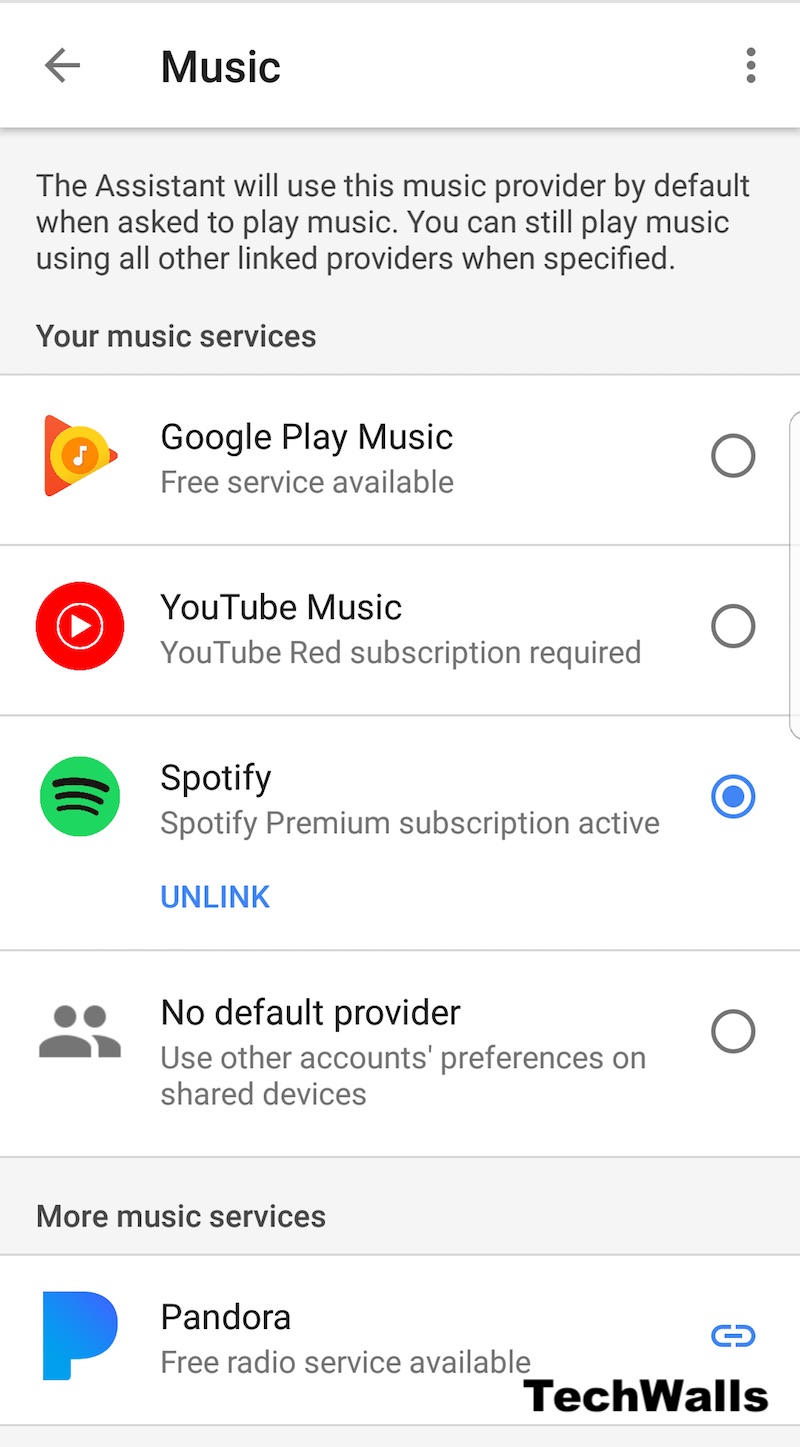
I started using Spotify again a few days ago. However, I had a problem integrating it into Google Home service. When I opened the Music tab in Google Home, Spotify didn’t show up and therefore, I couldn’t set it as the default music player.

I followed Google’s instructions to link my Spotify to Google account but it didn’t work as well. This is because I am using Google Home outside of the United States and some services are not showing up here. I had the Google Play Music service as the only option. Here is how to fix the issue.

I used PrivateInternetAccess, a VPN service, to change my location to the US. Then, restart the phone and all available services are showing up in Google Home now. I can easily set Spotify as the default music player and it will still be available even when I turn off the VPN service. You’ll just need to set it up once.
Let me know if you have the same issue and if the guide helps.
Reader Interactions

Comments

  1. Martin Burian says

    Jun 10, 2018 at 9:10 pm

    I had exactly the same problem, but with iPhoneX, Google home speaker brought from US installed in Korea and Spotify account created in Czech Republic. In Google Home app, the media accounts is named Managed connected accounts, but otherwise your Fix worked perfectly:-)

Disclosure: We might earn commission from qualifying purchases. The commission help keep the rest of my content free, so thank you!

Footer

Hisense M7SR 65″ Review: How Much TV Can You Get for the Money?

SEHMUA 2K Solar Security Cameras Review: An Incredible Value

Linkind Smart Light Stick Review: A Smart Bulb That Brings Flame Effects to Your Home

Svbony SVN W2 4K PTZ Webcam Review: A Smarter Upgrade for Video Calls and Streaming

Follow TechWalls

YoutubeFacebookXInstagram

Recent Posts

  • iSpring WHO32B Makes Whole-House Water Filtration Easier to Live With
  • Hisense M7SR 65″ Review: How Much TV Can You Get for the Money?
  • COZEWARE’s Smarter Approach to Year-Round Home Comfort: 3 Solutions for Modern Homes
  • iPhone Duo Model Number A3447, A3719, A3720, A3721 Differences

Copyright © 2026 · All Rights Reserved