By the name itself, you get the impression of what it is meant to do in general. Twitter’s Curator tool is built not only for media and for entertainment users, ordinary citizens can also find a vast set of applications for the service.
Twitter took the broad strokes to design Curator to search, filter and present tweets and other content in real-time on any display device – mobile phone, desktop, TV screen, etc. And the good news is it’s free to use. At its initial release, Curator is seen as most useful to publishers and broadcasters.
Well, put it more specifically, media outlets will be the most frequent users of the service in identifying and highlighting content for their audiences. At least that’s how Curator has started out following its soft launch in early 2015. When it was unveiled in London, Curator was still in beta and in limited availability.
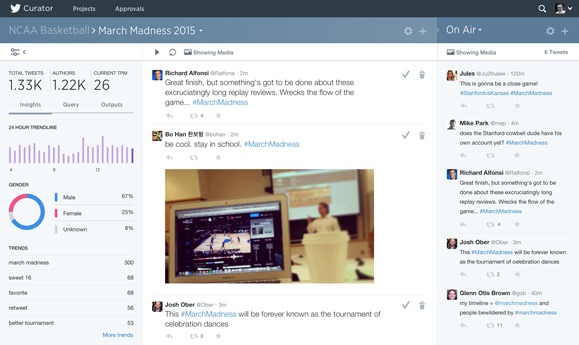
After Twitter rolled out the full version of the service, others might find that Curator could also help them embed real-time tweets and Vine videos in their websites and mobile apps more quickly and smoothly. That’s on top of broadcasts and other TV programs.
So with Curator, you will be able to filter through the sea of information and perform queries, simple or complex. You can, for example, curate tweets to learn about the popularity of your favorite celebrity or public figure. For media organizations, Curator is especially useful in displaying the public pulse on a particular topic of interest as the broadcast program is being aired. Weather forecast centers might also use the tool to provide the public with real-time feed of weather updates on any platform.
For entertainment shows that want to gauge their rank in trending posts on Twitter, Curator might just be the right tool for them, albeit an abundance of third-party apps for that purpose. The factors in making queries vary a lot, considering how huge the stream of tweets that comes from Twitter’s millions of users worldwide. These factors can include location, follower count, keywords, handles, or the number of re-tweets. Name it, and enter it into the query field.
There is also an option to exclude vulgar words from the query results. In looking for particular Vine videos, Curator includes filters to display live-streamed clips.
Twitter wants to make it clear, however, that Curator is not another data analytics tool, the kind that already abounds in the market. It is purely designed to show content in real-time based on filters. You can request access to Curator here.