In-app purchases in mobile apps have raised red flags lately following instances of huge bills incurred by parents because their kids are unwittingly spending their hard earned money to buy objects in the otherwise free to play games. Game developers have come under the radar for allegedly ‘pressurizing’ game player to buy in-game objects.
Many free to play games offer gems / jewels for a price to gamers using which they can advance to the next levels with ease. Such and many other objects are purchase by kids, in many cases unknowingly, across the world that cost parents quite a few bucks now and then. Instances of Danny Kitchen and Cameron Crossan in UK are well known as they have triggered the UK Government to investigate ‘commercially aggressive’ in-app purchases.
Disable In-App Purchases
If you believe your kids may be buying in-game objects in free to play iOS games, here are the steps that would allow you to disable those in-app purchases on iOS devices like iPad, iPhone and iPod touch.
- On the home screen tap on Settings;
- Tap on General;
- Scroll halfway down the page till you locate Restrictions;
- Tap on Restriction, which will enable the option;
- Enter a Passcode that you can easily remember but, ensure that it is not something that your kids might know; [Note: When you tap on Restrictions, you will be prompted to set a Passcode. This combination of 4 digits will allow you to lock certain functions of your iOS device.]
- You will be prompted to re-enter the Passcode to set it;
- Once you have set the Passcode, navigate to ‘Allowed Content’ section and locate ‘In-App Purchases’;
- Slide the In-App Purchases slider to Off position.
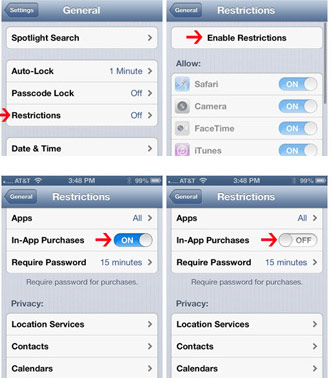
This will now prevent anyone without the knowledge of the Passcode from making any In-app purchases and prevent you from incurring huge bills.



