How many times do you go to the market and ask yourself how many eggs are left in the fridge? Or you open the fridge and have no idea how long have the eggs stayed there?
I often go to buy groceries just once a week and I always forget about the eggs. There should be an easy way to manage those information, and the simple idea is developed by Quirky. They just released Egg Minder, a smart egg tray, to solve the problem. Let’s check out our review of the product. The Egg Minder is a review unit but our review is 100% based on our opinions after trying the product.
The Egg Minder is made of high quality plastic and acrylic, it looks quite sturdy and a little heavy for an egg tray. You can watch the video below to see our unboxing video and how I tried to connect my phone to the Egg Minder.
As you can see in the video, I tried connecting my Samsung Galaxy Note 3 and Samsung Galaxy S3 to the Egg Minder but it failed all the times. I checked Wifi settings and put the phone very close to the tray, but it doesn’t work.
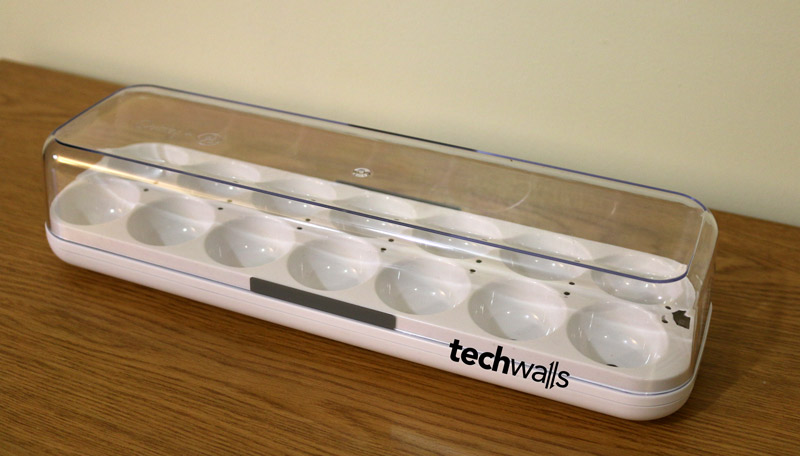
In theory, the smart egg tray could help me track the number of eggs left and I even could track dates of individual eggs to know when they go bad. The LED light beside each egg will indicate which egg should be used first. We can set the freshness period (which is recommended at around 3-5 weeks) to determine how long the eggs could stay. All those features are interesting, unfortunately, the unit I received seems to be defective and I couldn’t connect it at all. I hope they could sent the replacement soon.
If you like the idea, you can buy Egg Minder for $70 on their website and let me know if you have any problem syncing to your phone.



Hugo Fiennes says
Check to see if you have power save mode enabled on your phone – if so, disable it before you try the configuration… this is likely to help.
Tuan Do says
I disabled the power saver mode and it still doesn’t work.
Richard Hurtado says
Hey there Tuan Do
My name is Richard and I work for Quirky. We read your review and would like to reach out to you so that we may personally help you out with your Eggminder Problem
Please give us a call at 866-5Quirky
Thanks!
-Richard