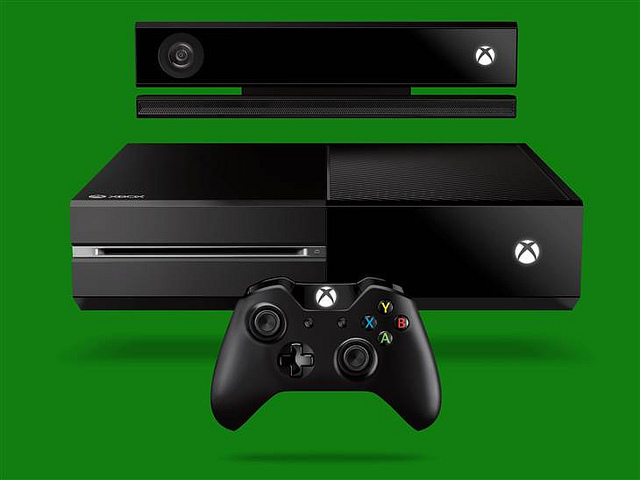
Microsoft has taken the wraps off its new gaming console, the Xbox One, during an event at its headquarters in Redmond, Wash. earlier today. Microsoft interactive entertainment business head Don Mattrick touted the Xbox One as an “all-in-one home entertainment system.” Available later this year, the console will ship with Skype and live TV integration to justify Mattrick’s claim.
The Xbox One comes with freshly updated games, TV, movies, sound tracks, a Web browser and mobile apps, as well as gesture and voice recognition to shift from one program to another, and multi-tasking capabilities.
Microsoft built the Xbox One to recognize users and automatically sign them in (if previous login details are already available) while displaying on screen their apps and games. Moreover, the console will show on home screen the last games and activities that users left off before logging out. The “Trending Tab” will also display the popular games and apps that friends and other users alike are up to.
The console has three built-in operating systems that users can switch from time to time such as the Xbox operating system, a Windows OS kernel and a combination of the two OS for users to perform multiple tasks. Another update to Xbox One includes a new Xbox Live system. It runs on an octa-core chipset, 8GB of RAM, Blu-ray, USB 3.0, HDMI in/out, and a 500GB drive.
Skype and Live TV
As Microsoft positions Xbox One as an all-in-one home entertainment system, a live TV streaming, group chat and video conference are possible with the console. The on-board Skype and live TV with Web surfing provide a feel of an “intelligent TV”, according to Yusuf Mehdi, corporate vice president of marketing, strategy and business for Microsoft’s interactive entertainment business.
The instant switching enables users to switch applications through voice commands. For instance, you can say “watch TV” to shift to the live TV application or “Go to Internet Explorer” to search the Internet.
With the “snapmode”, Xbox users can operate multiple programs without closing one app to run another. Multi-tasking at its best!
No Xbox 360 Games Support
However, the Xbox One is not compatible with the games built for the legacy Xbox 630. The new gaming consoles has an entirely alien chipset, the x86 from Advanced Micro Devices instead of the PowerPC from IBM as seen on previous consoles. That means you’ll have to retain your Xbox 360 if you have games installed in there that you treasure.
As of now, Microsoft has not provided any solution to the incompatibility. A cloud-based access to old titles could be a potential option, but it doesn’t appear to be coming soon to the Xbox One.